
Vulnerability and misconfiguration scanner
The appliance looks for what someone could walk in through: outdated versions, weak algorithms, forgotten services and systems that reached end of life.
- severity score for every finding
- CVSSseverity score for every finding
- quality of detection indicator
- 0-100 %quality of detection indicator
- scan types
- 4scan types
How it works
An administrator creates a task: an address range and a scan type. The task can be started, paused, resumed and deleted, and its progress is visible as a percentage right in the list.
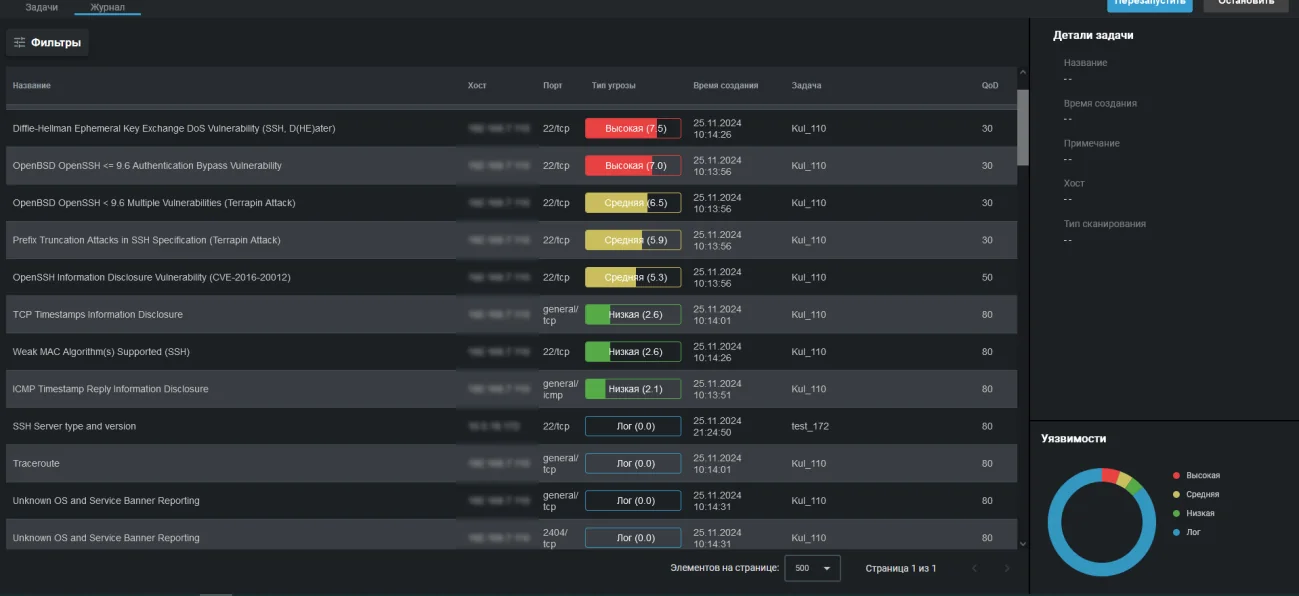
When it finishes, every finding lands in the log with a CVSS score and a colour coded severity level. Next to it sits the quality of detection value, from zero to one hundred per cent: it honestly states how reliable a particular conclusion is, so nobody wastes time on scanner guesses.
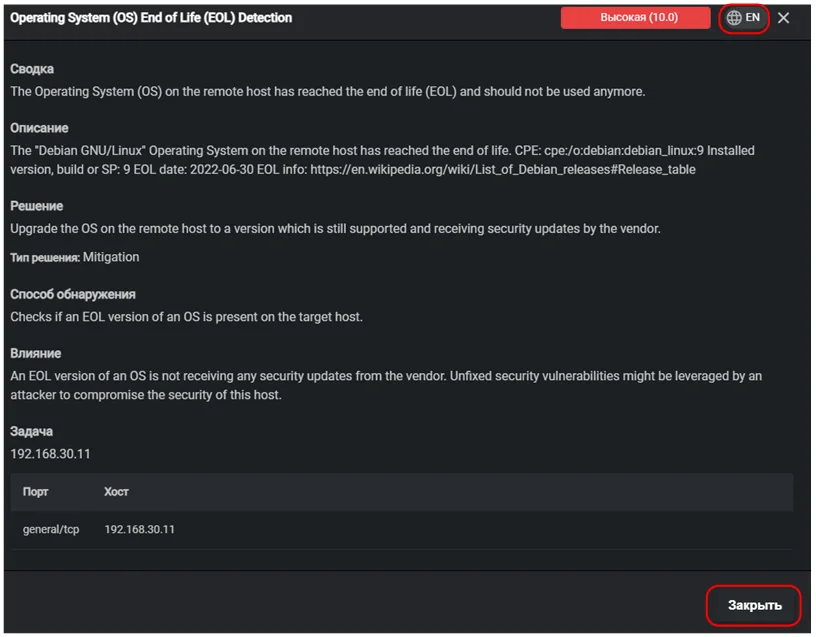
The key difference from a plain CVE list is that every threat card contains a ready solution. Not just update, but a specific instruction on what to raise and to which version, with a solution type and an impact assessment.
What it finds in practice
Examples of real findings from the appliance interface, with their severity levels.
- Operating system reached end of life
- Authentication bypass in OpenSSH up to version 8.6
- Denial of service through Diffie-Hellman key exchange
- OpenSSH vulnerabilities below version 9.6, Terrapin attack
- Prefix truncation in the SSH specification
- Information disclosure in OpenSSH
- Weak MAC algorithms supported in SSH
- Information disclosure through TCP timestamps
- Information disclosure through ICMP timestamp replies
Scan types
Basic scan
A quick check of a host or a range for vulnerabilities. Suitable for routine daily control.
Full scan
A deep check with a choice of port range: all ports, default ports, top 5000 or top 1000.
Host discovery
Finding live hosts in a given address range, without vulnerability checks.
System discovery
Identifying target systems, including installed operating systems and hardware in use.
All capabilities of the appliance
Capabilities of the appliance- Traffic monitoringThe appliance inspects a copy of your traffic, matches it against a signature database and raises an alarm when something happens that should not.Learn more
- Network inventoryThe appliance regularly recounts what lives in your network and reports when the picture changes: a new host appeared, a new port opened, a device went missing.Learn more
- Intruder honeypotThe appliance deploys a decoy in your network. A legitimate employee has no reason to touch it, so any request is a signal: somebody is already inside and looking around.Learn more
- Wi-Fi securityYou can build a perfect wired perimeter and still have somebody's personal router standing next to the finance department. The appliance listens to the air and shows what is going on.Learn more
- File integrityA modified router config or a replaced executable on a server generates no suspicious traffic. They are found by comparison against a baseline.Learn more
- Reports and SIEMThe appliance does not try to replace your security operations centre. It delivers events where they are already collected, and writes directly to whoever is on duty today.Learn more
We will prepare a quote for your network
Tell us about your infrastructure: how many sites, which switch sits in the core, whether you already run a SIEM. We will pick the edition and the connection scheme, and calculate the cost.
- We reply within one business day
- We design the connection scheme for your topology
- We show the interface on a live demo unit