
A honeypot for intruders inside the perimeter
The appliance deploys a decoy in your network. A legitimate employee has no reason to touch it, so any request is a signal: somebody is already inside and looking around.
- emulated decoy services
- 10emulated decoy services
- interaction levels
- 2interaction levels
- false positives by design
- 0false positives by design
How it works
The decoy is a deliberately vulnerable and misconfigured system left open to attack. Its only job is to draw the attention of somebody who already made it into the internal infrastructure, and to collect information about their tools and tactics.
The low interaction part emulates a set of network services on characteristic ports and records everything that arrives, down to a hexadecimal dump of the received data. It answers the question of who is scanning what inside the network.
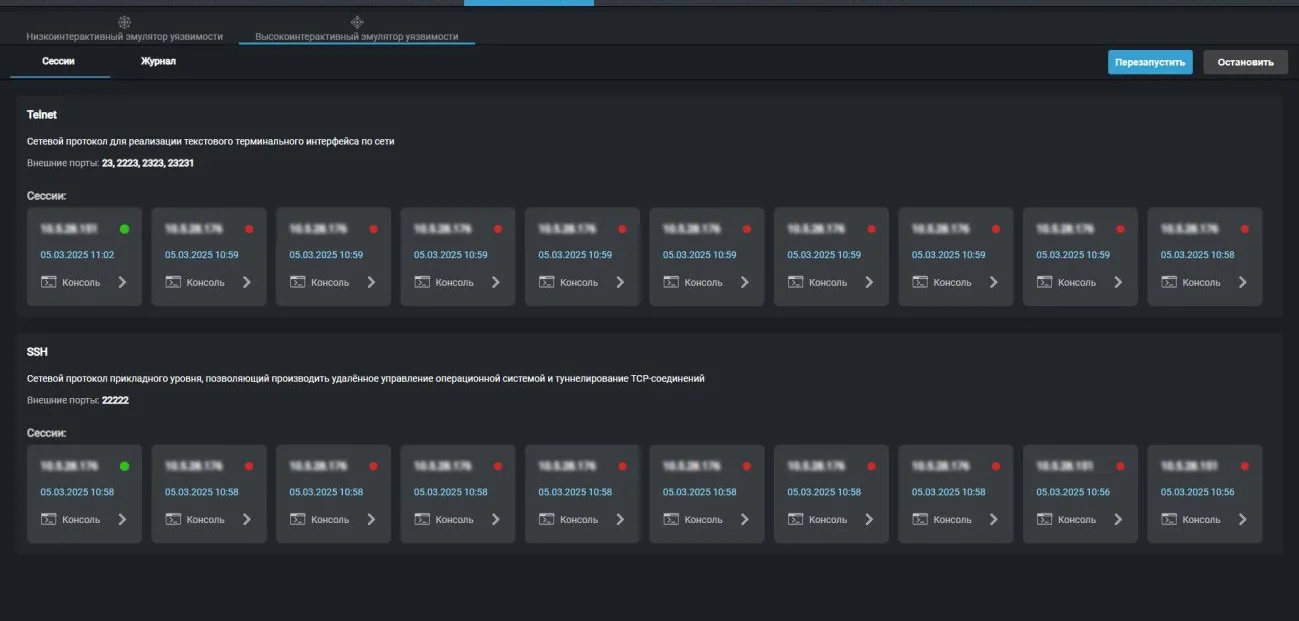
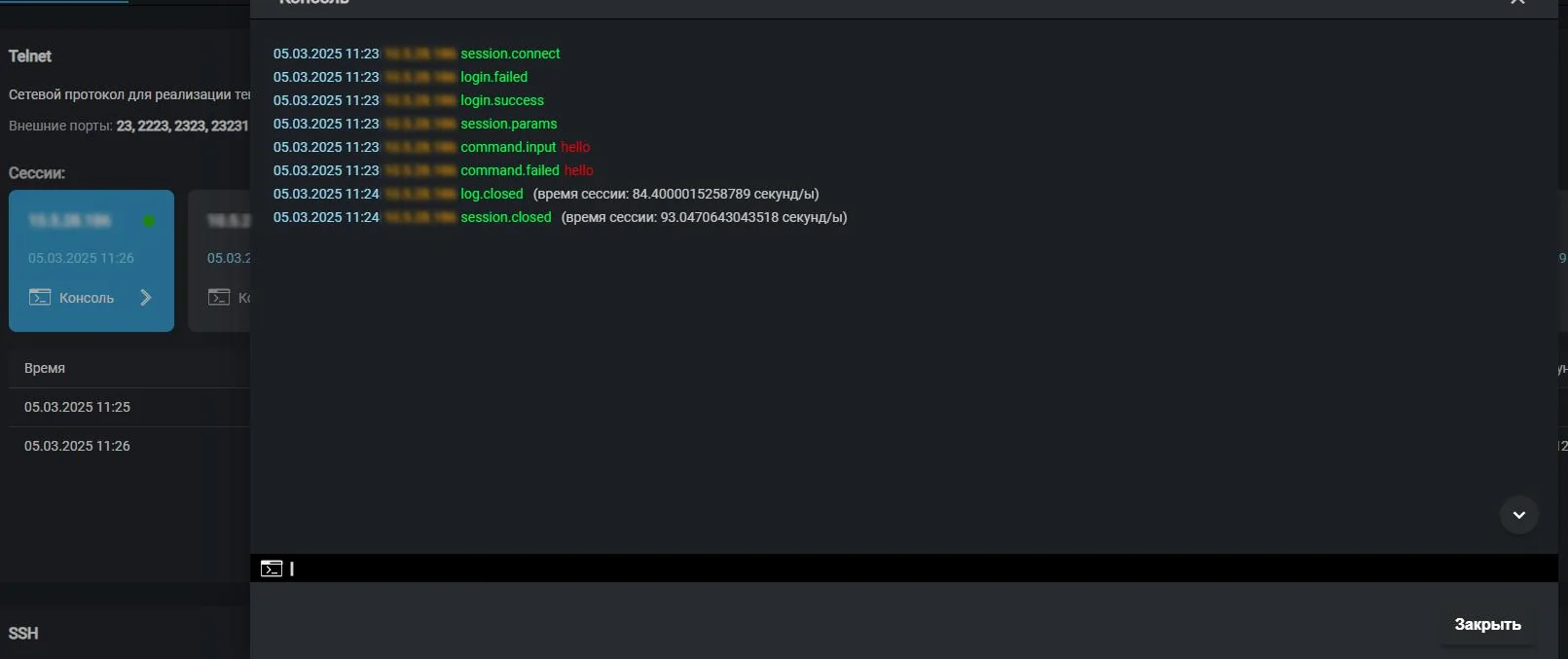
The high interaction part exposes Telnet and SSH and lets the intruder in. Every command they type lands in the session log: login attempts, password guessing, directory traversal, utility launches. A session can be watched live in the console while it is still running.
What gets recorded
- Successful login with a guessed password
- Failed login attempt
- Entered command with exact timing
- Connection established and closed
- Session duration in seconds
- Source address and port
- Daily chart of trigger counts
- Top 10 addresses by number of requests
- Distribution by country on a world map
- Distribution across decoy ports
- Counter of requests from local addresses

Which services are emulated
Low interaction decoy
Ten services on characteristic ports: MQTT, BitTorrent, SMTP, RDP, SMB, FTP, SIP, Jabber on two ports and Memcache. Every request lands in the log with its handler.
High interaction decoy
Telnet on four external ports and SSH on a dedicated port. The intruder gets a working shell, and the appliance gets a full record of their actions.
Statistics period
The last month is shown by default. The maximum statistics period is 31 days.
Decoy ports
| Service | Port | What is usually sought |
|---|---|---|
| RDP | 3389 | Windows remote desktop |
| SMB | 445 | Shared folders and file transfer |
| FTP | 21 | File exchange with weak authentication |
| SMTP | 25 | Open mail relay |
| SIP | 5060 | IP telephony |
| MQTT | 1883 | Industrial sensors and telemetry |
| Memcache | 11211 | Cache without authentication |
| Jabber | 5222, 5223 | Corporate messaging |
| BitTorrent | 6969 | File sharing traffic |
| Telnet | 23, 2223, 2323, 23231 | Equipment with factory passwords |
| SSH | 22222 | Password guessing and remote control |
All capabilities of the appliance
Capabilities of the appliance- Traffic monitoringThe appliance inspects a copy of your traffic, matches it against a signature database and raises an alarm when something happens that should not.Learn more
- Vulnerability scannerThe appliance looks for what someone could walk in through: outdated versions, weak algorithms, forgotten services and systems that reached end of life.Learn more
- Network inventoryThe appliance regularly recounts what lives in your network and reports when the picture changes: a new host appeared, a new port opened, a device went missing.Learn more
- Wi-Fi securityYou can build a perfect wired perimeter and still have somebody's personal router standing next to the finance department. The appliance listens to the air and shows what is going on.Learn more
- File integrityA modified router config or a replaced executable on a server generates no suspicious traffic. They are found by comparison against a baseline.Learn more
- Reports and SIEMThe appliance does not try to replace your security operations centre. It delivers events where they are already collected, and writes directly to whoever is on duty today.Learn more
We will prepare a quote for your network
Tell us about your infrastructure: how many sites, which switch sits in the core, whether you already run a SIEM. We will pick the edition and the connection scheme, and calculate the cost.
- We reply within one business day
- We design the connection scheme for your topology
- We show the interface on a live demo unit