
File and configuration integrity monitoring
A modified router config or a replaced executable on a server generates no suspicious traffic. They are found by comparison against a baseline.
- connection protocols to devices
- 4connection protocols to devices
- control modes
- 2control modes
- content hash comparison
- SHAcontent hash comparison
How it works
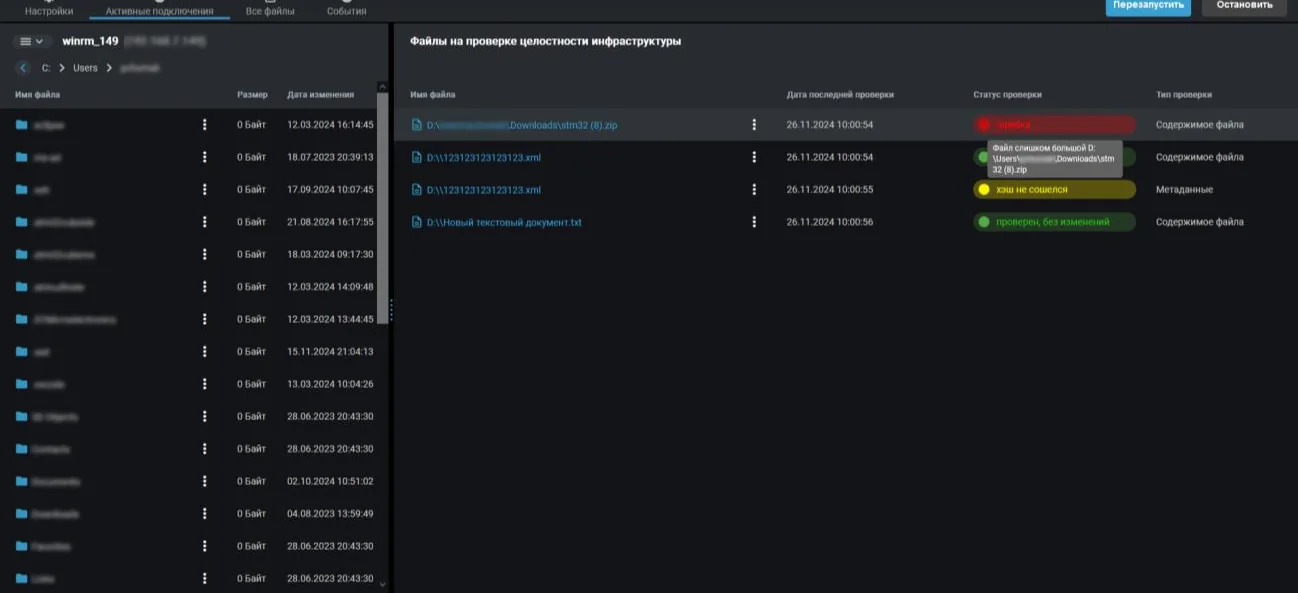
An administrator creates a connection to a device by providing the address, credentials, protocol and operating system. Once connected, the device file system opens and the required files or directories are moved into the control list.
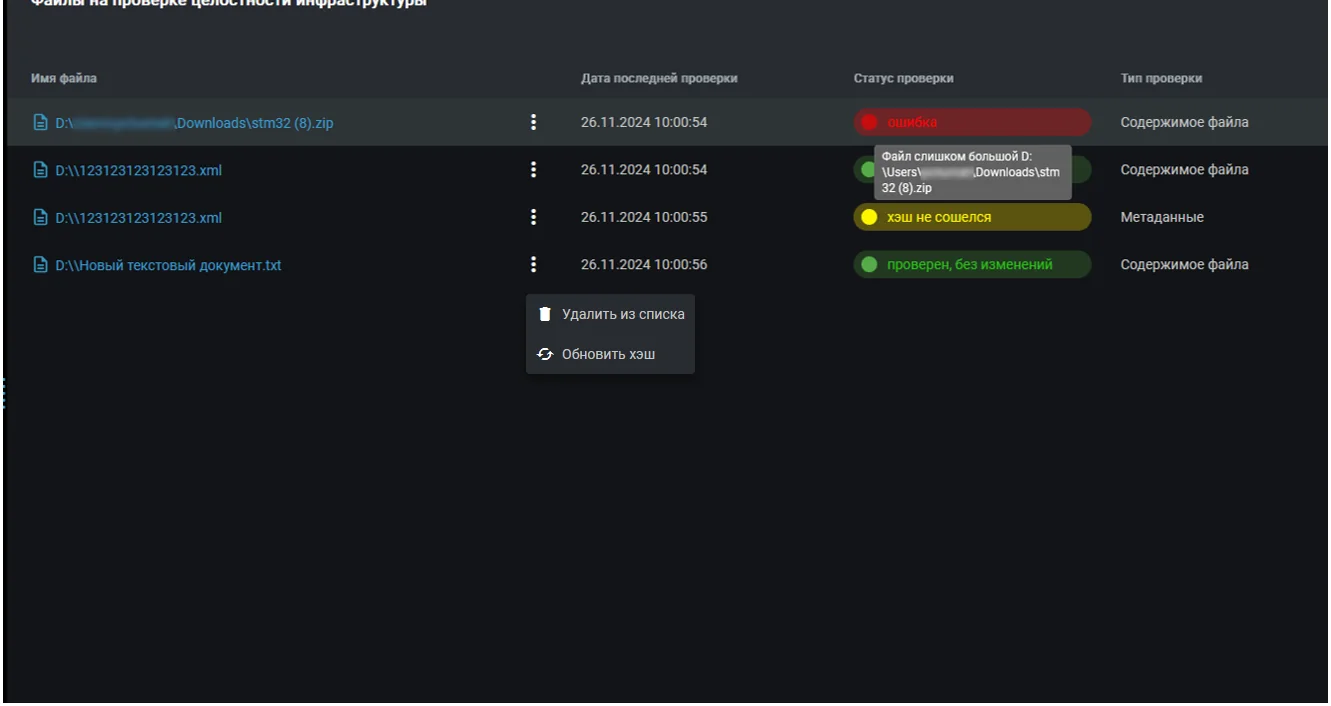
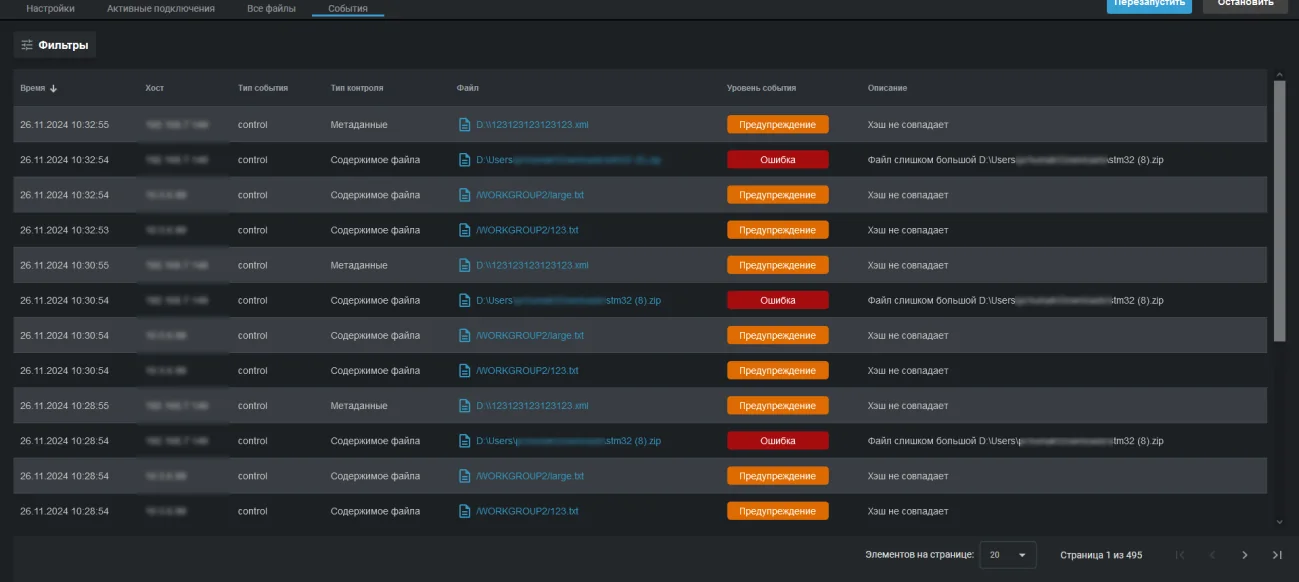
The reference value is stored at the moment a file is placed under control. After that the appliance recalculates and compares it periodically. A mismatch means the file was modified and lands in the event list with a description of the cause.
Control works in two modes. Content mode compares the hash of the file itself, so any change inside it is caught. Metadata mode compares creation and modification time, author and size: cheaper, and suitable for large files and whole directories.
What ends up in the events
- Hash does not match the baseline
- File metadata changed
- File unavailable or deleted
- Verification error with a stated cause
- Router and switch configurations
- Application and database server configuration files
- System directories and startup items
- Keys, certificates and access files
How it connects to devices
Protocols
SSH, WinRM, SMB and FTP. The connection port is set manually, SSH uses 22 by default.
Operating systems
Windows and Linux. WinRM has to be enabled on the remote device beforehand, and SMB requires raising the concurrent session limit.
Summary screen
A dedicated section shows the state of four connections at once, with search by connection name or address.
All capabilities of the appliance
Capabilities of the appliance- Traffic monitoringThe appliance inspects a copy of your traffic, matches it against a signature database and raises an alarm when something happens that should not.Learn more
- Vulnerability scannerThe appliance looks for what someone could walk in through: outdated versions, weak algorithms, forgotten services and systems that reached end of life.Learn more
- Network inventoryThe appliance regularly recounts what lives in your network and reports when the picture changes: a new host appeared, a new port opened, a device went missing.Learn more
- Intruder honeypotThe appliance deploys a decoy in your network. A legitimate employee has no reason to touch it, so any request is a signal: somebody is already inside and looking around.Learn more
- Wi-Fi securityYou can build a perfect wired perimeter and still have somebody's personal router standing next to the finance department. The appliance listens to the air and shows what is going on.Learn more
- Reports and SIEMThe appliance does not try to replace your security operations centre. It delivers events where they are already collected, and writes directly to whoever is on duty today.Learn more
We will prepare a quote for your network
Tell us about your infrastructure: how many sites, which switch sits in the core, whether you already run a SIEM. We will pick the edition and the connection scheme, and calculate the cost.
- We reply within one business day
- We design the connection scheme for your topology
- We show the interface on a live demo unit